NTFS - Analysis and recov3r
Analising NTFS, and recovering deleted files.
GitHub: https://github.com/MichaelMarkovsky/recov3r
First words
The following blog focuses on NTFS file system parsing, and recovering deleted data.
It includes my recov3r project which recovers deleted files make in a Windows created NTFS.
Generally to analyse raw data of disks the workflow is:
Physical HDD → forensic image (.img / .dd / .E01) → analysis (ImHex, Autopsy, etc.)Which is to not accidentally change metadata like timestamps…
Fantastic source: https://www.youtube.com/watch?v=BG1gQ4Ta79M&list=LL&index=15
Byte level NTFS documentation source: http://ftp.kolibrios.org/users/Asper/docs/NTFS/ntfsdoc.html
I will show a diagram of how the NTFS works to save up files and where:
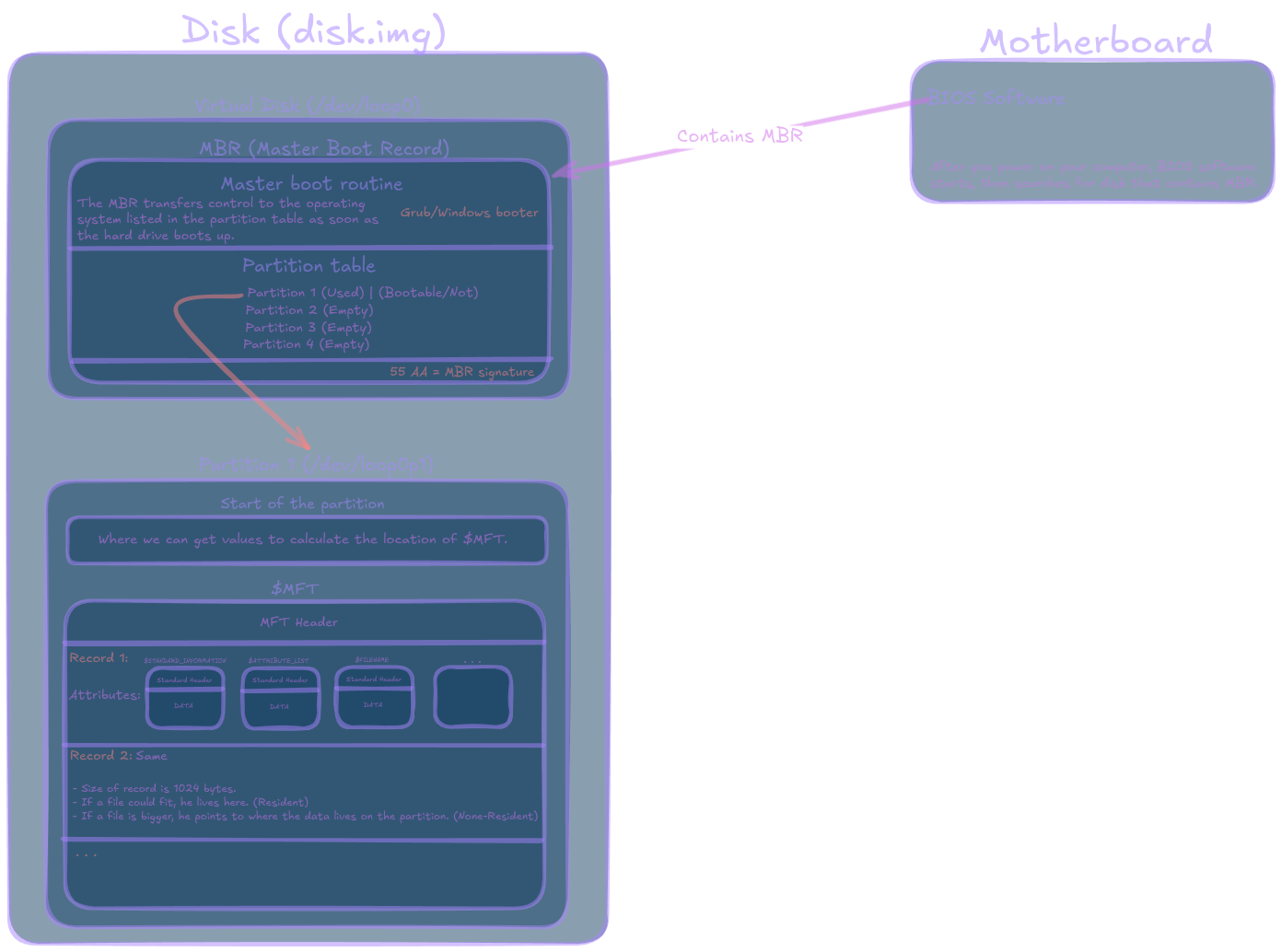
Steps of finding records and restoring their information:
1. Find MBR (or GPT on modern disks).

2. Read the partition table.

3. For each NTFS partition:
   a. Read the NTFS Boot Sector (VBR).
   b. Get:
      - Bytes per sector
      - Sectors per cluster
      - MFT starting cluster (LCN)
   c. Calculate the location of $MFT.

4. Parse MFT records.

5. For each MFT record:
   a. Check if the record is in use or deleted.
   b. Extract metadata:
      - Filename
      - Timestamps
      - Attributes
      - Parent directory

6. Find the $DATA attribute.

7. If the $DATA attribute is Resident:
      The file content is stored inside the MFT record itself.

8. If the $DATA attribute is Non-Resident:
      Read the run list (data runs).
      Use the run list to locate the clusters containing the file data.

9. Read the clusters and reconstruct the file.
Setup - Virtual disk creation
Start via having a test image in my arch linux system of NTFS.
- Creating a blank fake physical disk file I am creating a 512MB empty binary file filled with zeros:
dd if=/dev/zero of=disk.img bs=1M count=512dd - Low-level byte copier
/dev/zero = a Linux virtual device that outputs infinite 00 bytes
Basically i generate zero bytes, and output it to a file disk.img which becomes my fake hard drive.
bs=1M - Block size = 1 megabyte per write (it writes 1MB chunks).
It does that 512 times meaning : 512 × 1MB = 512MB total disk size (of zeros)
- Attach file as virtual disk Now we tell Linux to pretend this file is a real hard drive.
sudo losetup -fP disk.imglosetup - Linux tool that connects files ↔ loop devices
-f - Find free loop device automatically (Example: /dev/loop0)
-P - scan partition table and auto-create /dev/loop0p1 . it reads MBR ,detects partitions,exposes them as devices.
disk.img - The file we want to treat as a disk
Meaning Linux creates:
/dev/loop0     → whole disk
/dev/loop0p1   → partition (if exists)
Currently we have:
disk.img  → raw file
loop0     → virtual disk view of file
(no partitions yet visible meaningfully)- Create MBR partition table Now i write the master boot record structure at sector 0:
sudo parted /dev/loop0 mklabel msdosWhich writes at byte 0:
[446 bytes boot code (empty or generic)]
[64 bytes partition table]
[2 bytes signature 0x55AA]
msdos - MBR partitioning scheme
- Now we shall create a partition
sudo parted /dev/loop0 mkpart primary ntfs 1MiB 100%This basically adds an entry into the MBR partition table.
mkpart - Create partition entry
primary - Standard partition type (MBR allows up to 4 primary partitions)
ntfs - Just a lable hint
1MiB - Start position, meaning skip first 1MiB (reserved for alignment + MBR safety)
Meaning what is written is metadata:
MBR partition entry:
- start LBA = 2048
- size = rest of disk
- type = 0x07 (NTFS)
Now we have:
disk.img
├── MBR (partition table exists)
└── empty partition region (NOT formatted yet)- Formatting the partition
sudo mkfs.ntfs /dev/loop0p1We are formatting the partition to NTFS file system. Meaning we are writing:
- NTFS boot sector (VBR)
- NTFS metadata files:
| Name | MFT Record | Purpose |
|---|---|---|
$MFT |
0 | Master File Table (database of all files) |
$MFTMirr |
1 | Backup of first MFT records |
$LogFile |
2 | Transaction log (crash recovery) |
$Volume |
3 | Volume info (label, version, dirty flag) |
$AttrDef |
4 | Attribute definitions |
$Root |
5 | Root directory |
$Bitmap |
6 | Allocation bitmap (free/used clusters) |
$Boot |
7 | Boot sector metadata |
$BadClus |
8 | Bad cluster tracking |
$Secure |
9 | Security descriptors database |
$UpCase |
10 | Unicode uppercase table |
$Extend |
11 | Extension directory |
| Inside extend there are more, which i will not discuss. |
We are also creating the cluster allocation system:
- cluster size (usually 4KB)
- disk layout mapping
Now partition becomes a real filesystem:
/dev/loop0p1 = NTFS volume- Writing and reading files as user This is the step where we mount the disk to our machine, and then can use it as a regular user:
sudo mount /dev/loop0p1 /mnt/testLinux:
- reads NTFS boot sector
- parses MFT
- builds file tree in memory
- exposes it as a directory
Basically:
/mnt/test = “window into NTFS”Now we have:
disk.img (file on your SSD)
│
├── /dev/loop0 (virtual disk)
│     └── sector 0 → MBR
│
│
└── /dev/loop0p1 (partition)
      ├── NTFS boot sector
      ├── $MFT
      ├── files (a.txt, etc.)
      └── free space
Which is basically:
Physical Disk
│
├── Sector 0
│     └── MBR
│           └── Partition Table
│
├── Sector 1
├── Sector 2
├── ...
│
├── Sector 2048
│     └── NTFS Boot Sector
│
├── Sector 2080
│     └── $MFT
│
├── Sector 2082
│     └── $MFTMirr
│
├── Sector 3000
│     └── File data
│
└── Sector 4000
      └── More file data
We can write anything, and we could analyse that disk but for simplicity i will analyse the disk.img file.
So after we write into the disk , we shall unmount it:
sudo umount /mnt/testLinux:
- flushes all cached writes to disk
- closes the NTFS filesystem driver
- detaches the “window” (
/mnt/test) - ensures all changes are written back into
disk.img
To sum it up, we just created a virtual disk that is in a Physical file disk.img, which we can mount as a Virtual disk that contains a partition of the format NTFS.
Physical file (disk.img)
→ Virtual disk (/dev/loop0)
→ Partition (/dev/loop0p1)
→ Filesystem (NTFS)
→ Files (/mnt/test/a.txt)
Analysis importance:
disk.img
│
├── viewed directly → raw forensic view
│
├── mapped as /dev/loop0
│     └── kernel pretends it is hardware
│
└── mapped as /dev/loop0p1
      └── partition-only window
I will analyse the disk.img.
For testing and analysis, i have created:
/a.txt, wroteHello from the other side../b.txt, wrotesuper secret password: 123, renamed to/secret.txt, then deleted the file.- Copied
12 - High School Sweethearts.m4athe to disk , then deleted it.
Analysis time
MBR
I use the great tool ImHex editor to view the hex and bytes of data.
I opened the disk.img file and viewed the data.
First of all the first data we find is code for the MBR (Master Boot Record) which is 512 bytes of sector 0:
Hex View  00 01 02 03 04 05 06 07  08 09 0A 0B 0C 0D 0E 0F

00000000  00 00 00 00 00 00 00 00  00 00 00 00 00 00 00 00  ................
00000010  00 00 00 00 00 00 00 00  00 00 00 00 00 00 00 00  ................
00000020  00 00 00 00 00 00 00 00  00 00 00 00 00 00 00 00  ................
00000030  00 00 00 00 00 00 00 00  00 00 00 00 00 00 00 00  ................
00000040  00 00 00 00 00 00 00 00  00 00 00 00 00 00 00 00  ................
00000050  00 00 00 00 00 00 00 00  00 00 00 00 00 00 00 00  ................
00000060  00 00 00 00 00 00 00 00  00 00 00 00 00 00 00 00  ................
00000070  00 00 00 00 00 00 00 00  00 00 00 00 00 00 00 00  ................
00000080  00 00 00 00 00 00 00 00  00 00 00 00 00 00 00 00  ................
00000090  00 00 00 00 00 00 00 00  00 00 00 00 00 00 00 00  ................
000000A0  00 00 00 00 00 00 00 00  00 00 00 00 00 00 00 00  ................
000000B0  00 00 00 00 00 00 00 00  00 00 00 00 00 00 00 00  ................
000000C0  00 00 00 00 00 00 00 00  00 00 00 00 00 00 00 00  ................
000000D0  00 00 00 00 00 00 00 00  00 00 00 00 00 00 00 00  ................
000000E0  00 00 00 00 00 00 00 00  00 00 00 00 00 00 00 00  ................
000000F0  00 00 00 00 00 00 00 00  00 00 00 00 00 00 00 00  ................
00000100  00 00 00 00 00 00 00 00  00 00 00 00 00 00 00 00  ................
00000110  00 00 00 00 00 00 00 00  00 00 00 00 00 00 00 00  ................
00000120  00 00 00 00 00 00 00 00  00 00 00 00 00 00 00 00  ................
00000130  00 00 00 00 00 00 00 00  00 00 00 00 00 00 00 00  ................
00000140  00 00 00 00 00 00 00 00  00 00 00 00 00 00 00 00  ................
00000150  00 00 00 00 00 00 00 00  00 00 00 00 00 00 00 00  ................
00000160  00 00 00 00 00 00 00 00  00 00 00 00 00 00 00 00  ................
00000170  00 00 00 00 00 00 00 00  00 00 00 00 00 00 00 00  ................
00000180  00 00 00 00 00 00 00 00  00 00 00 00 00 00 00 00  ................
00000190  00 00 00 00 00 00 00 00  00 00 00 00 00 00 00 00  ................
000001A0  00 00 00 00 00 00 00 00  00 00 00 00 00 00 00 00  ................
000001B0  00 00 00 00 00 00 00 00  CD 86 3C 42 00 00 00 04  ..........<B....
000001C0  01 04 07 FE C2 FF 00 08  00 00 00 F8 0F 00 00 00  ................
000001D0  00 00 00 00 00 00 00 00  00 00 00 00 00 00 00 00  ................
000001E0  00 00 00 00 00 00 00 00  00 00 00 00 00 00 00 00  ................
000001F0  00 00 00 00 00 00 00 00  00 00 00 00 00 00 55 AA  ..............U.
Source: https://www.geeksforgeeks.org/operating-systems/mbr-master-boot-record/
The Master Boot Record (MBR) is the first sector on a hard drive that contains special data about the operating system that was used to start the computer. “Sector zero,” “master boot block,” or “master partition boot sector” are other terms for the Master Boot Sector.
This plays in the selection of a disk via the bios:
The BIOS software first assesses the hardware of the system and looks for boot devices that have an MBR. After that, it checks to see if the final signature is 55AAH by reading the first sector up to 0000:7C00H. In order to boot the OS, it then switches control to the MBR.
The volume boot code of the partition is used by the MBR boot code to determine which is the system partition. The OS is then started and the system is booted using the boot sector of the partition. The computer won’t start if the instructions aren’t followed, perhaps because the MBR isn’t there.
There are three sections to the Master Boot Record:
- Master boot routine: The 446-byte master boot routine includes a variable load coder, which is necessary data for the MBR. The MBR transfers control to the operating system listed in the partition table as soon as the hard drive boots up.
- Disk partition table (DPT): The DPT, which is found in the hard disk’s first sector, has information on the partitions’ positions. There are 64 bytes in it. Extended partitions can be made as needed, with a maximum of four partitions (16 bytes each).
- Identification code: The MBR can be identified by its identification code. It has a value of
55AAHorAA55Hand is 2 bytes in size.
Observations
In my example, we do not have variable load coder, which is why we see a lot of zeros at first. Meaning GRUB / Windows boot sector is empty, meaning there is no option to boot an operating system on the drive, which is exactly as I configured.
The MBR can be recognized via 55 AA.
Hex View  00 01 02 03 04 05 06 07  08 09 0A 0B 0C 0D 0E 0F

000001B0  00 00 00 00 00 00 00 00  CD 86 3C 42 00 00 00 04  ..........<B....
000001C0  01 04 07 FE C2 FF 00 08  00 00 00 F8 0F 00 00 00  ................
000001D0  00 00 00 00 00 00 00 00  00 00 00 00 00 00 00 00  ................
000001E0  00 00 00 00 00 00 00 00  00 00 00 00 00 00 00 00  ................
000001F0  00 00 00 00 00 00 00 00  00 00 00 00 00 00 55 AA  ..............U.
At the bottom we can observe that there are 4 partition, which only 1 is used:
Hex View  00 01 02 03 04 05 06 07  08 09 0A 0B 0C 0D 0E 0F

000001B0  00 00 00 00 00 00 00 00  CD 86 3C 42 00 00 00 04
													 ^^^^^
000001C0  01 04 07 FE C2 FF 00 08  00 00 00 F8 0F 00 00 00
          ^^^^^^^^^^^^^^^^^^^^^^^^^^^^^^^^^^^^^^^^^^|^^^^^
                 Partition Entry #1 (used)

000001D0  00 00 00 00 00 00 00 00  00 00 00 00 00 00 00 00
          ^^^^^^^^^^^^^^^^^^^^^^^^^^^^^^^^^^^^^^^^^^|^^^^^
                 Partition Entry #2 (empty)

000001E0  00 00 00 00 00 00 00 00  00 00 00 00 00 00 00 00
          ^^^^^^^^^^^^^^^^^^^^^^^^^^^^^^^^^^^^^^^^^^|^^^^^
                 Partition Entry #3 (empty)

000001F0  00 00 00 00 00 00 00 00  00 00 00 00 00 00 55 AA
          ^^^^^^^^^^^^^^^^^^^^^^^^^^^^^^^^^^^^^^^^^^^
                 Partition Entry #4 (empty)

                                              55 AA = MBR signature
The partition that is used:
00 04 01 04 07 FE C2 FF 00 08 00 00 00 F8 0F 00 Rules:
Byte  Meaning
----  ------------------
0     Boot flag
1-3   Starting CHS
4     Partition type
5-7   Ending CHS
8-11  Starting LBA
12-15 Number of sectors
The first byte is shows us if the partition is a active/bootable or not bootable.
0x80= active/bootable0x00= not bootable In our example its0x00= not bootable.
Beginning of the partition in CHS notation 04 01 04 , which is not used today.
The next important byte is 07, which tells us the type of the partition, which is NTFS.
End of the partition in CHS FE C2 FF.
What is important here is 00 08 00 00, starting LBA notation.
Meaning it has to be reversed when reading, so it turns to 00 00 08 00.
Starting LBA = absolute disk offset where the partition begins
- Meaning, LBA is
2048 bytes = 0x00000800 - Block size is alway
512 bytes = 0x0200 bytes
The number 512 bytes (Block size) is used because it represents the standard size of a single storage sector on a hard drive in bytes.
Starting partition calculation:0x00000800 multiply by 0x0200 = 0x00100000 = 1,048,576 bytes = 1 Mib
Meaning the partition begins at 0x00100000.
Partition
When jumping via control+g in imhex, to 0x00100000, I see the start (first sector) of the partition:
Hex View  00 01 02 03 04 05 06 07  08 09 0A 0B 0C 0D 0E 0F

00100000  EB 52 90 4E 54 46 53 20  20 20 20 00 02 08 00 00  .R.NTFS    .....
00100010  00 00 00 00 00 F8 00 00  00 00 00 00 00 00 00 00  ................
00100020  00 00 00 00 80 00 80 00  FF F7 0F 00 00 00 00 00  ................
00100030  04 00 00 00 00 00 00 00  7F FF 00 00 00 00 00 00  ................
00100040  F6 00 00 00 01 00 00 00  1D FC C6 25 79 65 38 20  ...........%ye8
00100050  00 00 00 00 0E 1F BE 71  7C AC 22 C0 74 0B 56 B4  .......q|.".t.V.
00100060  0E BB 07 00 CD 10 5E EB  F0 32 E4 CD 16 CD 19 EB  ......^..2......
00100070  FE 54 68 69 73 20 69 73  20 6E 6F 74 20 61 20 62  .This is not a b
00100080  6F 6F 74 61 62 6C 65 20  64 69 73 6B 2E 20 50 6C  ootable disk. Pl
00100090  65 61 73 65 20 69 6E 73  65 72 74 20 61 20 62 6F  ease insert a bo
001000A0  6F 74 61 62 6C 65 20 66  6C 6F 70 70 79 20 61 6E  otable floppy an
001000B0  64 0D 0A 70 72 65 73 73  20 61 6E 79 20 6B 65 79  d..press any key
001000C0  20 74 6F 20 74 72 79 20  61 67 61 69 6E 20 2E 2E   to try again ..
001000D0  2E 20 0D 0A 00 00 00 00  00 00 00 00 00 00 00 00  . ..............
001000E0  00 00 00 00 00 00 00 00  00 00 00 00 00 00 00 00  ................
001000F0  00 00 00 00 00 00 00 00  00 00 00 00 00 00 00 00  ................
00100100  00 00 00 00 00 00 00 00  00 00 00 00 00 00 00 00  ................
00100110  00 00 00 00 00 00 00 00  00 00 00 00 00 00 00 00  ................
00100120  00 00 00 00 00 00 00 00  00 00 00 00 00 00 00 00  ................
00100130  00 00 00 00 00 00 00 00  00 00 00 00 00 00 00 00  ................
00100140  00 00 00 00 00 00 00 00  00 00 00 00 00 00 00 00  ................
00100150  00 00 00 00 00 00 00 00  00 00 00 00 00 00 00 00  ................
00100160  00 00 00 00 00 00 00 00  00 00 00 00 00 00 00 00  ................
00100170  00 00 00 00 00 00 00 00  00 00 00 00 00 00 00 00  ................
00100180  00 00 00 00 00 00 00 00  00 00 00 00 00 00 00 00  ................
00100190  00 00 00 00 00 00 00 00  00 00 00 00 00 00 00 00  ................
001001A0  00 00 00 00 00 00 00 00  00 00 00 00 00 00 00 00  ................
001001B0  00 00 00 00 00 00 00 00  00 00 00 00 00 00 00 00  ................
001001C0  00 00 00 00 00 00 00 00  00 00 00 00 00 00 00 00  ................
001001D0  00 00 00 00 00 00 00 00  00 00 00 00 00 00 00 00  ................
001001E0  00 00 00 00 00 00 00 00  00 00 00 00 00 00 00 00  ................
001001F0  00 00 00 00 00 00 00 00  00 00 00 00 00 00 55 AA  ..............U.
Observations
Boot jump bytes are EB 52 90 :
EB= JMP instruction52= jump offset90= NOP (padding) This is x86 boot code entry point , BIOS jumps here after loading sector into memory.
We can see the 4 magic numbers are 4E 54 46 53 20 20 20 20, which can be converted to NTFS , that tells use the file system of the partition.
Right after we have bytes per sector 00 02 ,Little endian meaning we shall read it backwards to 0x0200 = 512 bytes per sector.
Then we have 08, which is 8 sectors per cluster.
Meaning 512 × 8 = 4096 bytes (4 KB cluster size).
Reserved fields for perhaps later use:
00 00 00 00 00 F8 00 00 00 00 00 00 00 00 00 00 00 00 00 00 80 00 80 00And then we have FF F7 0F 00 which converts as Little endian to 0x000FF7FF = 1,046,527 sectors which is the total size of the partition in sectors.
We know that a sector is 512 bytes , meaning the total size of the partition is 1,046,527 × 512 ≈ 535,821,824 bytes which is 511.00 MB.
Now this make sense because, we created the starting position of the partition after skipping first 1MiB (reserved for alignment + MBR safety).
Now for the important part, which is location the MFT file.
Hex View  00 01 02 03 04 05 06 07  08 09 0A 0B 0C 0D 0E 0F

00100030  04 00 00 00 00 00 00 00                           ........
The start of the Master File Table is 04 00 00 00 00 00 00 00 to Little endian is 00 00 00 00 00 00 00 40 which is 0x0000000000000004 = starts in 4 clusters.
Meaning the $MFT starts at the location 4 x 4096 bytes = 16384 bytes = 0x4000.
This meanings that from our current position we need to add those bytes: 0x00100000 + 0x4000 = 0x00104000.
Location of $MFT is 0x00104000.
$MFT
We jump to 0x00104000 which is the location of the $MFT file:
Hex View  00 01 02 03 04 05 06 07  08 09 0A 0B 0C 0D 0E 0F

00104000  46 49 4C 45 30 00 03 00  00 00 00 00 00 00 00 00  FILE0...........
00104010  01 00 01 00 38 00 01 00  98 01 00 00 00 04 00 00  ....8...........
00104020  00 00 00 00 00 00 00 00  04 00 00 00 00 00 00 00  ................
00104030  03 00 00 00 00 00 00 00  10 00 00 00 60 00 00 00  ............`...
00104040  00 00 18 00 00 00 00 00  48 00 00 00 18 00 00 00  ........H.......
00104050  00 AF B5 F6 18 EE DC 01  00 AF B5 F6 18 EE DC 01  ................
00104060  00 AF B5 F6 18 EE DC 01  00 AF B5 F6 18 EE DC 01  ................
00104070  06 00 00 00 00 00 00 00  00 00 00 00 00 00 00 00  ................
00104080  00 00 00 00 00 01 00 00  00 00 00 00 00 00 00 00  ................
00104090  00 00 00 00 00 00 00 00  30 00 00 00 68 00 00 00  ........0...h...
001040A0  00 00 18 00 00 00 02 00  4A 00 00 00 18 00 01 00  ........J.......
001040B0  05 00 00 00 00 00 05 00  00 AF B5 F6 18 EE DC 01  ................
001040C0  00 AF B5 F6 18 EE DC 01  00 AF B5 F6 18 EE DC 01  ................
001040D0  00 AF B5 F6 18 EE DC 01  00 70 00 00 00 00 00 00  .........p......
001040E0  00 6C 00 00 00 00 00 00  06 00 00 00 00 00 00 00  .l..............
001040F0  04 03 24 00 4D 00 46 00  54 00 00 00 00 00 00 00  ..$.M.F.T.......
00104100  80 00 00 00 48 00 00 00  01 00 40 00 00 00 01 00  ....H.....@.....
00104110  00 00 00 00 00 00 00 00  1F 01 00 00 00 00 00 00  ................
00104120  40 00 00 00 00 00 00 00  00 00 12 00 00 00 00 00  @...............
00104130  00 00 12 00 00 00 00 00  00 00 12 00 00 00 00 00  ................
00104140  12 20 01 04 00 00 00 00  B0 00 00 00 48 00 00 00  . ..........H...
00104150  01 00 40 00 00 00 03 00  00 00 00 00 00 00 00 00  ..@.............
00104160  00 00 00 00 00 00 00 00  40 00 00 00 00 00 00 00  ........@.......
00104170  00 10 00 00 00 00 00 00  90 00 00 00 00 00 00 00  ................
00104180  90 00 00 00 00 00 00 00  11 01 02 00 00 00 00 00  ................
00104190  FF FF FF FF 00 00 00 00  00 00 00 00 00 00 00 00  ................
001041A0  00 00 00 00 00 00 00 00  00 00 00 00 00 00 00 00  ................
001041B0  00 00 00 00 00 00 00 00  00 00 00 00 00 00 00 00  ................
001041C0  00 00 00 00 00 00 00 00  00 00 00 00 00 00 00 00  ................
001041D0  00 00 00 00 00 00 00 00  00 00 00 00 00 00 00 00  ................
001041E0  00 00 00 00 00 00 00 00  00 00 00 00 00 00 00 00  ................
001041F0  00 00 00 00 00 00 00 00  00 00 00 00 00 00 03 00  ................
...
Observations
We now know the location of the MFT table and since we also know the record size, we can simply parse the whole MFT table as we iterate through all the records and sort them via flags.
Meaning we can then understand and extract all files and their data whose been deleted as well.
We found then the first record of the MFT file, which is the MFT header meaning it stores information about the structure of the MFT table.
Instead of analyzing specifically the first record, I think it would be more interesting to analyze a user created record.
Right before I do that, I will map the first contents the of table and its location:
| Record | Location | Name |
|---|---|---|
| 0 | 00104000 | $MFT |
| 1 | 00104400 | $MFTMir |
| 2 | 00104800 | $LogFile |
| 3 | 00104C00 | $Volume |
| 4 | 00105000 | $AttrDef |
| 5 | 00105400 | $I30 |
| 6 | 00105800 | $Bitmap |
| 7 | 00105C00 | $Boot |
| 8 | 00106000 | $BadClus |
| 9 | 00106400 | $Secure |
| 10 | 00106800 | $UpCase |
| 11 | 00106C00 | $Extend |
| … |
Record Types
Files can be saved in 2 types:
- Resident file which is a file that is able to have all its data stored entirely inside the record of the MFT, which has to be under 1024 bytes.
- None-Resident file is a file that its data cannot be fit into the record of MFT, meaning we will see instead the location of the data written inside the record, which we can then recover.
$MFT Record
Since this is a record of the MFT , we shall look at how a record looks like:
+----------------------+
|     MFT Record       |
|----------------------|
| Record Header        |
|----------------------|
| Attribute 1          |
|  - Attribute Header  |
|  - Attribute Data    |
|----------------------|
| Attribute 2          |
|  - Attribute Header  |
|  - Attribute Data    |
|----------------------|
| Attribute 3          |
|  - Attribute Header  |
|  - Attribute Data    |
|----------------------|
| 0xFFFFFFFF (End)     |
+----------------------+
Attribute Headers
Each Attribute has an Attribute Header. Since there are 2 types of records, resident and none-resident , we also have 2 different headers, which their beginning is the same but the rest of their rows are different.
Based on which is which via the flag, we choose our rest of the rows:
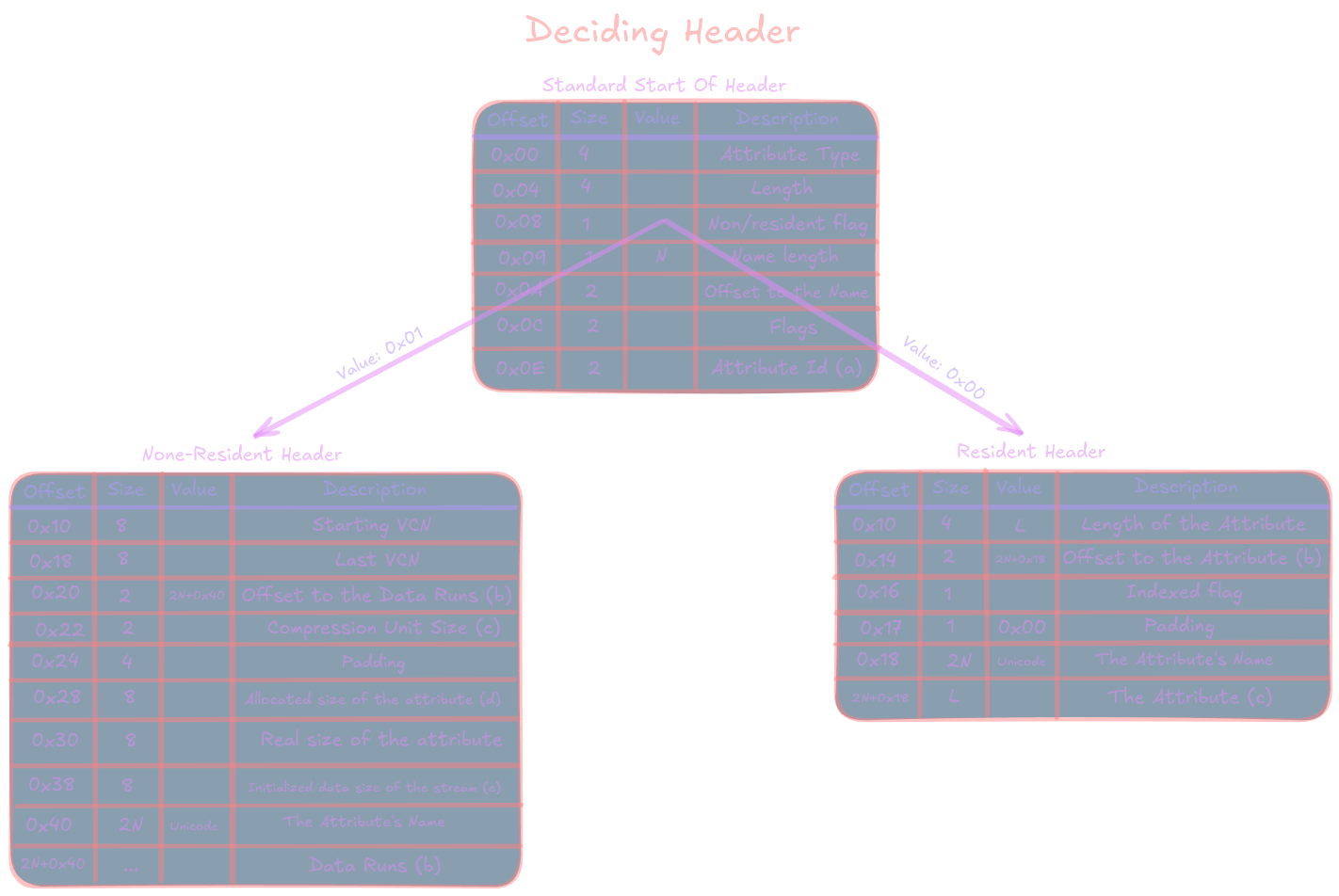
The tables: Layout of a resident named attribute header
| Offset | Size | Value | Description |
|---|---|---|---|
| 0x00 | 4 | Attribute Type (e.g. 0x90, 0xB0) | |
| 0x04 | 4 | Length (including this header) | |
| 0x08 | 1 | 0x00 | Non-resident flag |
| 0x09 | 1 | N | Name length |
| 0x0A | 2 | 0x18 | Offset to the Name |
| 0x0C | 2 | 0x00 | Flags |
| 0x0E | 2 | Attribute Id (a) | |
| 0x10 | 4 | L | Length of the Attribute |
| 0x14 | 2 | 2N+0x18 | Offset to the Attribute (b) |
| 0x16 | 1 | Indexed flag | |
| 0x17 | 1 | 0x00 | Padding |
| 0x18 | 2N | Unicode | The Attribute’s Name |
| 2N+0x18 | L | The Attribute (c) |
Attribute flags
| Flag | Description |
|---|---|
| 0x0000 | Normal |
| 0x0001 | Compressed |
| 0x4000 | Encrypted |
| 0x8000 | Sparse |
Layout of a non-resident named attribute header
| Offset | Size | Value | Description |
|---|---|---|---|
| 0x00 | 4 | Attribute Type (e.g. 0x80, 0xA0) | |
| 0x04 | 4 | Length (including this header) | |
| 0x08 | 1 | 0x01 | Non-resident flag |
| 0x09 | 1 | N | Name length |
| 0x0A | 2 | 0x40 | Offset to the Name |
| 0x0C | 2 | Flags | |
| 0x0E | 2 | Attribute Id (a) | |
| 0x10 | 8 | Starting VCN | |
| 0x18 | 8 | Last VCN | |
| 0x20 | 2 | 2N+0x40 | Offset to the Data Runs (b) |
| 0x22 | 2 | Compression Unit Size (c) | |
| 0x24 | 4 | 0x00 | Padding |
| 0x28 | 8 | Allocated size of the attribute (d) | |
| 0x30 | 8 | Real size of the attribute | |
| 0x38 | 8 | Initialized data size of the stream (e) | |
| 0x40 | 2N | Unicode | The Attribute’s Name |
| 2N+0x40 | … | Data Runs (b) |
Attribute flags
| Flag | Description |
|---|---|
| 0x0001 | Compressed |
| 0x4000 | Encrypted |
| 0x8000 | Sparse |
Attributes
The record contains the following attributes, some of which could be empty:
| Type | OS | Name |
|---|---|---|
| 0x10 | $STANDARD_INFORMATION | |
| 0x20 | $ATTRIBUTE_LIST | |
| 0x30 | $FILE_NAME | |
| 0x40 | NT | $VOLUME_VERSION |
| 0x40 | 2K | $OBJECT_ID |
| 0x50 | $SECURITY_DESCRIPTOR | |
| 0x60 | $VOLUME_NAME | |
| 0x70 | $VOLUME_INFORMATION | |
| 0x80 | $DATA | |
| 0x90 | $INDEX_ROOT | |
| 0xA0 | $INDEX_ALLOCATION | |
| 0xB0 | $BITMAP | |
| 0xC0 | NT | $SYMBOLIC_LINK |
| 0xC0 | 2K | $REPARSE_POINT |
| 0xD0 | $EA_INFORMATION | |
| 0xE0 | $EA | |
| 0xF0 | NT | $PROPERTY_SET |
| 0x100 | 2K | $LOGGED_UTILITY_STREAM |
Resident file
Now we shall analyse a record of the MFT table, which is a user created file in this instance:
Hex View  00 01 02 03 04 05 06 07  08 09 0A 0B 0C 0D 0E 0F

0010B000  46 49 4C 45 2A 00 03 00  00 00 00 00 00 00 00 00  FILE*...........
0010B010  02 00 01 00 30 00 01 00  B0 01 00 00 00 04 00 00  ....0...........
0010B020  00 00 00 00 00 00 00 00  05 00 67 04 00 00 00 00  ..........g.....
0010B030  10 00 00 00 60 00 00 00  00 00 00 00 00 00 00 00  ....`...........
0010B040  48 00 00 00 18 00 00 00  E7 EF 17 FB 19 EE DC 01  H...............
0010B050  E7 EF 17 FB 19 EE DC 01  18 65 18 FB 19 EE DC 01  .........e......
0010B060  E7 EF 17 FB 19 EE DC 01  20 00 00 00 00 00 00 00  ........ .......
0010B070  00 00 00 00 00 00 00 00  00 00 00 00 02 01 00 00  ................
0010B080  00 00 00 00 00 00 00 00  00 00 00 00 00 00 00 00  ................
0010B090  30 00 00 00 68 00 00 00  00 00 00 00 00 00 01 00  0...h...........
0010B0A0  4C 00 00 00 18 00 01 00  05 00 00 00 00 00 05 00  L...............
0010B0B0  E7 EF 17 FB 19 EE DC 01  E7 EF 17 FB 19 EE DC 01  ................
0010B0C0  18 65 18 FB 19 EE DC 01  E7 EF 17 FB 19 EE DC 01  .e..............
0010B0D0  20 00 00 00 00 00 00 00  1B 00 00 00 00 00 00 00   ...............
0010B0E0  20 00 00 00 3C 00 00 00  05 00 61 00 2E 00 74 00   ...<.....a...t.
0010B0F0  78 00 74 00 00 00 00 00  80 00 00 00 38 00 00 00  x.t.........8...
0010B100  00 00 18 00 00 00 02 00  1B 00 00 00 18 00 00 00  ................
0010B110  48 65 6C 6C 6F 20 66 72  6F 6D 20 74 68 65 20 6F  Hello from the o
0010B120  74 68 65 72 20 73 69 64  65 2E 0A 00 00 00 00 00  ther side.......
0010B130  D0 00 00 00 20 00 00 00  00 00 18 00 00 00 03 00  .... ...........
0010B140  08 00 00 00 18 00 00 00  2D 00 00 00 3C 00 00 00  ........-...<...
0010B150  E0 00 00 00 58 00 00 00  00 00 18 00 00 00 04 00  ....X...........
0010B160  3C 00 00 00 18 00 00 00  14 00 00 00 00 06 04 00  <...............
0010B170  24 4C 58 55 49 44 00 E8  03 00 00 00 14 00 00 00  $LXUID..........
0010B180  00 06 04 00 24 4C 58 47  49 44 00 E8 03 00 00 00  ....$LXGID......
0010B190  14 00 00 00 00 06 04 00  24 4C 58 4D 4F 44 00 A4  ........$LXMOD..
0010B1A0  81 00 00 00 00 00 00 00  FF FF FF FF 00 00 00 00  ................
0010B1B0  00 00 00 00 00 00 00 00  00 00 00 00 00 00 00 00  ................
0010B1C0  00 00 00 00 00 00 00 00  00 00 00 00 00 00 00 00  ................
0010B1D0  00 00 00 00 00 00 00 00  00 00 00 00 00 00 00 00  ................
0010B1E0  00 00 00 00 00 00 00 00  00 00 00 00 00 00 00 00  ................
0010B1F0  00 00 00 00 00 00 00 00  00 00 00 00 00 00 67 04  ..............g.
0010B200  00 00 00 00 00 00 00 00  00 00 00 00 00 00 00 00  ................
0010B210  00 00 00 00 00 00 00 00  00 00 00 00 00 00 00 00  ................
0010B220  00 00 00 00 00 00 00 00  00 00 00 00 00 00 00 00  ................
0010B230  00 00 00 00 00 00 00 00  00 00 00 00 00 00 00 00  ................
0010B240  00 00 00 00 00 00 00 00  00 00 00 00 00 00 00 00  ................
0010B250  00 00 00 00 00 00 00 00  00 00 00 00 00 00 00 00  ................
0010B260  00 00 00 00 00 00 00 00  00 00 00 00 00 00 00 00  ................
0010B270  00 00 00 00 00 00 00 00  00 00 00 00 00 00 00 00  ................
0010B280  00 00 00 00 00 00 00 00  00 00 00 00 00 00 00 00  ................
0010B290  00 00 00 00 00 00 00 00  00 00 00 00 00 00 00 00  ................
0010B2A0  00 00 00 00 00 00 00 00  00 00 00 00 00 00 00 00  ................
0010B2B0  00 00 00 00 00 00 00 00  00 00 00 00 00 00 00 00  ................
0010B2C0  00 00 00 00 00 00 00 00  00 00 00 00 00 00 00 00  ................
0010B2D0  00 00 00 00 00 00 00 00  00 00 00 00 00 00 00 00  ................
0010B2E0  00 00 00 00 00 00 00 00  00 00 00 00 00 00 00 00  ................
0010B2F0  00 00 00 00 00 00 00 00  00 00 00 00 00 00 00 00  ................
0010B300  00 00 00 00 00 00 00 00  00 00 00 00 00 00 00 00  ................
0010B310  00 00 00 00 00 00 00 00  00 00 00 00 00 00 00 00  ................
0010B320  00 00 00 00 00 00 00 00  00 00 00 00 00 00 00 00  ................
0010B330  00 00 00 00 00 00 00 00  00 00 00 00 00 00 00 00  ................
0010B340  00 00 00 00 00 00 00 00  00 00 00 00 00 00 00 00  ................
0010B350  00 00 00 00 00 00 00 00  00 00 00 00 00 00 00 00  ................
0010B360  00 00 00 00 00 00 00 00  00 00 00 00 00 00 00 00  ................
0010B370  00 00 00 00 00 00 00 00  00 00 00 00 00 00 00 00  ................
0010B380  00 00 00 00 00 00 00 00  00 00 00 00 00 00 00 00  ................
0010B390  00 00 00 00 00 00 00 00  00 00 00 00 00 00 00 00  ................
0010B3A0  00 00 00 00 00 00 00 00  00 00 00 00 00 00 00 00  ................
0010B3B0  00 00 00 00 00 00 00 00  00 00 00 00 00 00 00 00  ................
0010B3C0  00 00 00 00 00 00 00 00  00 00 00 00 00 00 00 00  ................
0010B3D0  00 00 00 00 00 00 00 00  00 00 00 00 00 00 00 00  ................
0010B3E0  00 00 00 00 00 00 00 00  00 00 00 00 00 00 00 00  ................
0010B3F0  00 00 00 00 00 00 00 00  00 00 00 00 00 00 67 04  ..............g.
I have analyzed via the tables below the Resident file’s record:
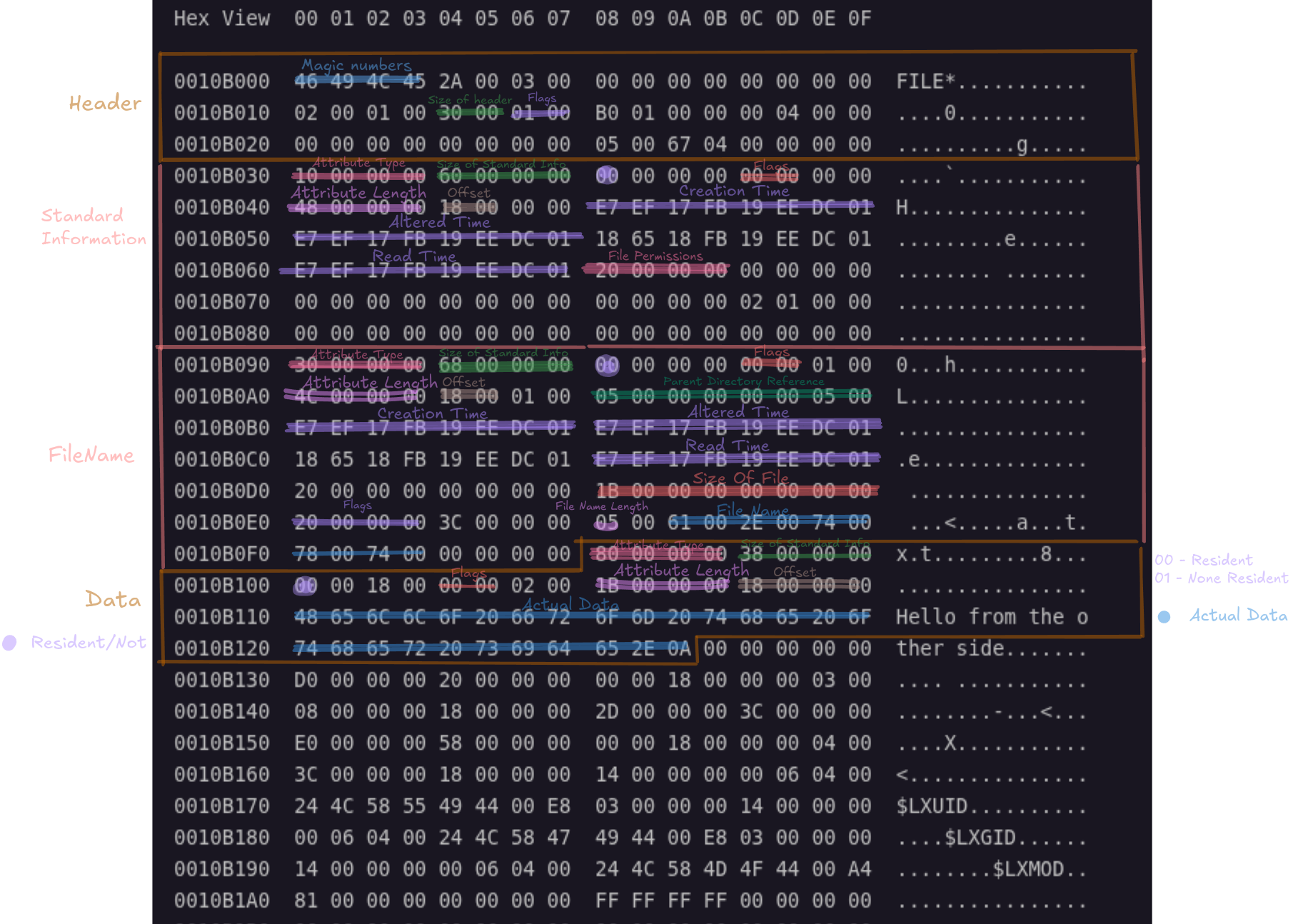 As seen , i have chosen to focus on what was important for showing important fields like time of creations,offsets and so on.
Every record has a Record header, and has many attributes: Record Header
| Offset | Size | OS | Description |
|---|---|---|---|
| 0x00 | 4 | Magic number ‘FILE’ | |
| 0x04 | 2 | Offset to the update sequence | |
| 0x06 | 2 | Size in words of Update Sequence Number & Array (S) | |
| 0x08 | 8 | $LogFile Sequence Number (LSN) | |
| 0x10 | 2 | Sequence number | |
| 0x12 | 2 | Hard link count | |
| 0x14 | 2 | Offset to the first Attribute | |
| 0x16 | 2 | Flags | |
| 0x18 | 4 | Real size of the FILE record | |
| 0x1C | 4 | Allocated size of the FILE record | |
| 0x20 | 8 | File reference to the base FILE record | |
| 0x28 | 2 | Next Attribute Id | |
| 0x2A | 2 | XP | Align to 4 byte boundary |
| 0x2C | 4 | XP | Number of this MFT Record |
| 2 | Update Sequence Number (a) | ||
| 2S-2 | Update Sequence Array (a) | ||
| In my example: |
Magic number - 46 49 4C 45
Offset to the first Attribute - 30 00
Flags - 01 00
File record flags
| Flags value | Meaning |
|---|---|
| 0x00 | Deleted file |
| 0x01 | Active file |
| 0x02 | Deleted directory |
| 0x03 | Active directory |
| 0x04 / 0x08 / combinations | Non-standard / rare cases (ignore in basic parsing) |
Now I chose to focus on : $STANDARD_INFORMATION ,$FILE_NAME ,$DATA:
Layout of the $STANDARD_INFORMATION (0x10) attribute
| Offset | Size | OS | Description |
|---|---|---|---|
| ~ | ~ | Standard Attribute Header | |
| 0x00 | 8 | C Time - File Creation | |
| 0x08 | 8 | A Time - File Altered | |
| 0x10 | 8 | M Time - MFT Changed | |
| 0x18 | 8 | R Time - File Read | |
| 0x20 | 4 | DOS File Permissions | |
| 0x24 | 4 | Maximum Number of Versions | |
| 0x28 | 4 | Version Number | |
| 0x2C | 4 | Class Id | |
| 0x30 | 4 | 2K | Owner Id |
| 0x34 | 4 | 2K | Security Id |
| 0x38 | 8 | 2K | Quota Charged |
| 0x40 | 8 | 2K | Update Sequence Number (USN) |
In my example:
Header:
	Attribute Type - 10 00 00 00
	Length (including this header) - 60 00 00 00
	Non-resident/Resident flag - 00
	Flags - 00 00
	Offset to the Attribute - 18 00

Attribute:
	Creation Time - E7 EF 17 FB 19 EE DC 01
	Altered Time - E7 EF 17 FB 19 EE DC 01
	Read Time - E7 EF 17 FB 19 EE DC 01
	File Permissions - 20 00 00 00
File Permissions
| Flag | Description |
|---|---|
| 0x0001 | Read-Only |
| 0x0002 | Hidden |
| 0x0004 | System |
| 0x0020 | Archive |
| 0x0040 | Device |
| 0x0080 | Normal |
| 0x0100 | Temporary |
| 0x0200 | Sparse File |
| 0x0400 | Reparse Point |
| 0x0800 | Compressed |
| 0x1000 | Offline |
| 0x2000 | Not Content Indexed |
| 0x4000 | Encrypted |
Layout of the $FILE_NAME (0x30) attribute
| Offset | Size | Description |
|---|---|---|
| ~ | ~ | Standard Attribute Header |
| 0x00 | 8 | File reference to the parent directory. |
| 0x08 | 8 | C Time - File Creation |
| 0x10 | 8 | A Time - File Altered |
| 0x18 | 8 | M Time - MFT Changed |
| 0x20 | 8 | R Time - File Read |
| 0x28 | 8 | Allocated size of the file |
| 0x30 | 8 | Real size of the file |
| 0x38 | 4 | Flags, e.g. Directory, compressed, hidden |
| 0x3c | 4 | Used by EAs and Reparse |
| 0x40 | 1 | Filename length in characters (L) |
| 0x41 | 1 | Filename namespace 0x42 2L File name in Unicode (not null terminated) |
| In my example: |
Header:
	Attribute Type - 30 00 00 00
	Length (including this header) - 68 00 00 00
	Non-resident/Resident flag - 00
	Flags - 00 00
	Offset to the Attribute - 18 00

Attribute:
	File reference to the parent directory - 05 00 00 00 00 05 00
	Creation Time - E7 EF 17 FB 19 EE DC 01
	Altered Time - E7 EF 17 FB 19 EE DC 01
	Read Time - E7 EF 17 FB 19 EE DC 01
	Size of File - 1B 00 00 00 00 00 00 00
	Flags - 20 00 00 00
	File Name Length - 05
	File Name - 61 00 2E 00 74 00 78 00 74 00
File Flags
| Flag | Description |
|---|---|
| 0x0001 | Read-Only |
| 0x0002 | Hidden |
| 0x0004 | System |
| 0x0020 | Archive |
| 0x0040 | Device |
| 0x0080 | Normal |
| 0x0100 | Temporary |
| 0x0200 | Sparse File |
| 0x0400 | Reparse Point |
| 0x0800 | Compressed |
| 0x1000 | Offline |
| 0x2000 | Not Content Indexed |
| 0x4000 | Encrypted |
| 0x10000000 | Directory (copy from corresponding bit in MFT record) |
| 0x20000000 | Index View (copy from corresponding bit in MFT record) |
Layout of the $DATA (0x80) attribute
| Offset | Size | Description |
|---|---|---|
| ~ | ~ | Standard Attribute Header |
| 0x00 | Any data | |
| In my example: |
Header:
	Attribute Type - 80 00 00 00
	Length (including this header) - 38 00 00 00
	Non-resident/Resident flag - 00
	Flags - 00 00
	Length of the Attribute - 18 00 00 00
	Offset to the Attribute - 18 00

Attribute:
	Acual Data - 48 65 6C 6C 6F 20 66 72  6F 6D 20 74 68 65 20 6F 74 68 65 72 20 73 69 64  65 2E 0A
To sum this up, we found a file with the following data:
========================== RECORD HEADER ==============================
Magic number - 46 49 4C 45
Offset to the first Attribute - 30 00
Flags - 01 00
========================== STANDARD INFORMATION =======================
Header:
	Attribute Type - 10 00 00 00
	Length (including this header) - 60 00 00 00
	Non-resident/Resident flag - 00
	Flags - 00 00
	Offset to the Attribute - 18 00

Attribute:
	Creation Time - E7 EF 17 FB 19 EE DC 01
	Altered Time - E7 EF 17 FB 19 EE DC 01
	Read Time - E7 EF 17 FB 19 EE DC 01
	File Permissions - 20 00 00 00
=========================== FILE NAME =================================
Header:
	Attribute Type - 30 00 00 00
	Length (including this header) - 68 00 00 00
	Non-resident/Resident flag - 00
	Flags - 00 00
	Offset to the Attribute - 18 00

Attribute:
	File reference to the parent directory - 05 00 00 00 00 05 00
	Creation Time - E7 EF 17 FB 19 EE DC 01
	Altered Time - E7 EF 17 FB 19 EE DC 01
	Read Time - E7 EF 17 FB 19 EE DC 01
	Size of File - 1B 00 00 00 00 00 00 00
	Flags - 20 00 00 00
	File Name Length - 05
	File Name - 61 00 2E 00 74 00 78 00 74 00
================================ DATA =================================
Header:
	Attribute Type - 80 00 00 00
	Length (including this header) - 38 00 00 00
	Non-resident/Resident flag - 00
	Flags - 00 00
	Offset to the Attribute - 18 00

Attribute:
	Acual Data - 48 65 6C 6C 6F 20 66 72  6F 6D 20 74 68 65 20 6F 74 68 65 72 20 73 69 64  65 2E 0A
Summary
| Item | Value |
|---|---|
| MFT Record Type | File |
| Status | In Use |
| Filename | a.txt |
| Parent Directory | Root (MFT #5) |
| Size | 27 bytes |
| Attributes | Archive |
| Creation Time | 2026-05-27 20:47:06 UTC |
| Modified Time | 2026-05-27 20:47:06 UTC |
| Read Time | 2026-05-27 20:47:06 UTC |
| Resident Data | Yes |
| Content | Hello from the other side. |
Recovering Resident File
This is the easiest recovery method, because we already have all the data in our record.
dd if=(DISK_LOCATION) of=(FILE_NAME) bs=1 skip=$((DATA_HEADER_LOCATION + DATA_OFFSET)) count=FILE_SIZESo in our example:
DISK_LOCATION=./disk.imgFILE_NAME=a.txt$DATA attribute header starts = 0x0010B0F8(Where does the record start)DATA_OFFSET (inside MFT) = 18 00 -> 0x18FILE_SIZE = 27 bytes
Where the data lives = 0x0010B0F8 + 0x18 = 0x0010B110
Meaning:
dd if=disk.img of=a.txt bs=1 skip=$((0x0010B110)) count=27

27+0 records in
27+0 records out
27 bytes copied, 0.000374215 s, 72.2 kB/s
cat a.txt
Hello from the other side.And we got the file!!
Even if was deleted, it only sets the flag of the record as deleted, the information still exists within the record, meaning the same command will recover deleted information.
None Resident file
Since we now seen the resident file’s example, i shall write only unique points that are for the none-resident file.
A none-resident file is a record that its data could not fully store in the $MFT, since it more than the threshold of 1024 bytes for a record, therefore creates pointers to where the rest of the data resigns.
The copied file, which was deleted 12 - High School Sweethearts.m4a:
Hex View  00 01 02 03 04 05 06 07  08 09 0A 0B 0C 0D 0E 0F

0010B400  46 49 4C 45 2A 00 03 00  00 00 00 00 00 00 00 00  FILE*...........
0010B410  04 00 01 00 30 00 01 00  F8 01 00 00 00 04 00 00  ....0...........
0010B420  00 00 00 00 00 00 00 00  06 00 01 00 00 00 00 00  ................
0010B430  10 00 00 00 60 00 00 00  00 00 00 00 00 00 00 00  ....`...........
0010B440  48 00 00 00 18 00 00 00  C0 C7 32 66 DF F1 DC 01  H.........2f....
0010B450  63 A6 33 5B 9F C2 DC 01  EE D9 3C 66 DF F1 DC 01  c.3[......<f....
0010B460  E2 23 3F 66 DF F1 DC 01  20 00 00 00 00 00 00 00  .#?f.... .......
0010B470  00 00 00 00 00 00 00 00  00 00 00 00 02 01 00 00  ................
0010B480  00 00 00 00 00 00 00 00  00 00 00 00 00 00 00 00  ................
0010B490  30 00 00 00 A0 00 00 00  00 00 00 00 00 00 01 00  0...............
0010B4A0  82 00 00 00 18 00 01 00  05 00 00 00 00 00 05 00  ................
0010B4B0  C0 C7 32 66 DF F1 DC 01  63 A6 33 5B 9F C2 DC 01  ..2f....c.3[....
0010B4C0  EE D9 3C 66 DF F1 DC 01  E2 23 3F 66 DF F1 DC 01  ..<f.....#?f....
0010B4D0  00 D0 4D 00 00 00 00 00  F7 CC 4D 00 00 00 00 00  ..M.......M.....
0010B4E0  20 00 00 00 3C 00 00 00  20 00 31 00 32 00 20 00   ...<... .1.2. .
0010B4F0  2D 00 20 00 48 00 69 00  67 00 68 00 20 00 53 00  -. .H.i.g.h. .S.
0010B500  63 00 68 00 6F 00 6F 00  6C 00 20 00 53 00 77 00  c.h.o.o.l. .S.w.
0010B510  65 00 65 00 74 00 68 00  65 00 61 00 72 00 74 00  e.e.t.h.e.a.r.t.
0010B520  73 00 2E 00 6D 00 34 00  61 00 00 00 00 00 00 00  s...m.4.a.......
0010B530  80 00 00 00 48 00 00 00  01 00 40 00 00 00 05 00  ....H.....@.....
0010B540  00 00 00 00 00 00 00 00  DC 04 00 00 00 00 00 00  ................
0010B550  40 00 00 00 00 00 00 00  00 D0 4D 00 00 00 00 00  @.........M.....
0010B560  F7 CC 4D 00 00 00 00 00  F7 CC 4D 00 00 00 00 00  ..M.......M.....
0010B570  32 DD 04 0E 02 01 00 00  D0 00 00 00 20 00 00 00  2........... ...
0010B580  00 00 18 00 00 00 03 00  08 00 00 00 18 00 00 00  ................
0010B590  2D 00 00 00 3C 00 00 00  E0 00 00 00 58 00 00 00  -...<.......X...
0010B5A0  00 00 18 00 00 00 04 00  3C 00 00 00 18 00 00 00  ........<.......
0010B5B0  14 00 00 00 00 06 04 00  24 4C 58 55 49 44 00 E8  ........$LXUID..
0010B5C0  03 00 00 00 14 00 00 00  00 06 04 00 24 4C 58 47  ............$LXG
0010B5D0  49 44 00 E8 03 00 00 00  14 00 00 00 00 06 04 00  ID..............
0010B5E0  24 4C 58 4D 4F 44 00 A4  81 00 00 00 00 00 00 00  $LXMOD..........
0010B5F0  FF FF FF FF 00 00 00 00  00 00 00 00 00 00 01 00  ................
0010B600  00 00 00 00 00 00 00 00  00 00 00 00 00 00 00 00  ................
0010B610  00 00 00 00 00 00 00 00  00 00 00 00 00 00 00 00  ................
0010B620  00 00 00 00 00 00 00 00  00 00 00 00 00 00 00 00  ................
0010B630  00 00 00 00 00 00 00 00  00 00 00 00 00 00 00 00  ................
0010B640  00 00 00 00 00 00 00 00  00 00 00 00 00 00 00 00  ................
0010B650  00 00 00 00 00 00 00 00  00 00 00 00 00 00 00 00  ................
0010B660  00 00 00 00 00 00 00 00  00 00 00 00 00 00 00 00  ................
0010B670  00 00 00 00 00 00 00 00  00 00 00 00 00 00 00 00  ................
0010B680  00 00 00 00 00 00 00 00  00 00 00 00 00 00 00 00  ................
0010B690  00 00 00 00 00 00 00 00  00 00 00 00 00 00 00 00  ................
0010B6A0  00 00 00 00 00 00 00 00  00 00 00 00 00 00 00 00  ................
0010B6B0  00 00 00 00 00 00 00 00  00 00 00 00 00 00 00 00  ................
0010B6C0  00 00 00 00 00 00 00 00  00 00 00 00 00 00 00 00  ................
0010B6D0  00 00 00 00 00 00 00 00  00 00 00 00 00 00 00 00  ................
0010B6E0  00 00 00 00 00 00 00 00  00 00 00 00 00 00 00 00  ................
0010B6F0  00 00 00 00 00 00 00 00  00 00 00 00 00 00 00 00  ................
0010B700  00 00 00 00 00 00 00 00  00 00 00 00 00 00 00 00  ................
0010B710  00 00 00 00 00 00 00 00  00 00 00 00 00 00 00 00  ................
0010B720  00 00 00 00 00 00 00 00  00 00 00 00 00 00 00 00  ................
0010B730  00 00 00 00 00 00 00 00  00 00 00 00 00 00 00 00  ................
0010B740  00 00 00 00 00 00 00 00  00 00 00 00 00 00 00 00  ................
0010B750  00 00 00 00 00 00 00 00  00 00 00 00 00 00 00 00  ................
0010B760  00 00 00 00 00 00 00 00  00 00 00 00 00 00 00 00  ................
0010B770  00 00 00 00 00 00 00 00  00 00 00 00 00 00 00 00  ................
0010B780  D0 00 00 00 20 00 00 00  00 00 18 00 00 00 03 00  .... ...........
0010B790  08 00 00 00 18 00 00 00  2D 00 00 00 3C 00 00 00  ........-...<...
0010B7A0  E0 00 00 00 58 00 00 00  00 00 18 00 00 00 04 00  ....X...........
0010B7B0  3C 00 00 00 18 00 00 00  14 00 00 00 00 06 04 00  <...............
0010B7C0  24 4C 58 55 49 44 00 E8  03 00 00 00 14 00 00 00  $LXUID..........
0010B7D0  00 06 04 00 24 4C 58 47  49 44 00 E8 03 00 00 00  ....$LXGID......
0010B7E0  14 00 00 00 00 06 04 00  24 4C 58 4D 4F 44 00 A4  ........$LXMOD..
0010B7F0  81 00 00 00 00 00 00 00  FF FF FF FF 00 00 01 00  ................
Since its a none-resident file, the header table is different so i used the non-resident named attribute header.
I will focus on the data:
Hex View  00 01 02 03 04 05 06 07  08 09 0A 0B 0C 0D 0E 0F

0010B530  80 00 00 00 48 00 00 00  01 00 40 00 00 00 05 00  ....H.....@.....
0010B540  00 00 00 00 00 00 00 00  DC 04 00 00 00 00 00 00  ................
0010B550  40 00 00 00 00 00 00 00  00 D0 4D 00 00 00 00 00  @.........M.....
0010B560  F7 CC 4D 00 00 00 00 00  F7 CC 4D 00 00 00 00 00  ..M.......M.....
0010B570  32 DD 04 0E 02 01 00 00  D0 00 00 00 20 00 00 00  2........... ...
0010B580  00 00 18 00 00 00 03 00  08 00 00 00 18 00 00 00  ................
0010B590  2D 00 00 00 3C 00 00 00  E0 00 00 00 58 00 00 00  -...<.......X...
0010B5A0  00 00 18 00 00 00 04 00  3C 00 00 00 18 00 00 00  ........<.......
0010B5B0  14 00 00 00 00 06 04 00  24 4C 58 55 49 44 00 E8  ........$LXUID..
0010B5C0  03 00 00 00 14 00 00 00  00 06 04 00 24 4C 58 47  ............$LXG
0010B5D0  49 44 00 E8 03 00 00 00  14 00 00 00 00 06 04 00  ID..............
0010B5E0  24 4C 58 4D 4F 44 00 A4  81 00 00 00 00 00 00 00  $LXMOD..........
0010B5F0  FF FF FF FF 00 00 00 00  00 00 00 00 00 00 01 00  ................
I have highlighted the important data:
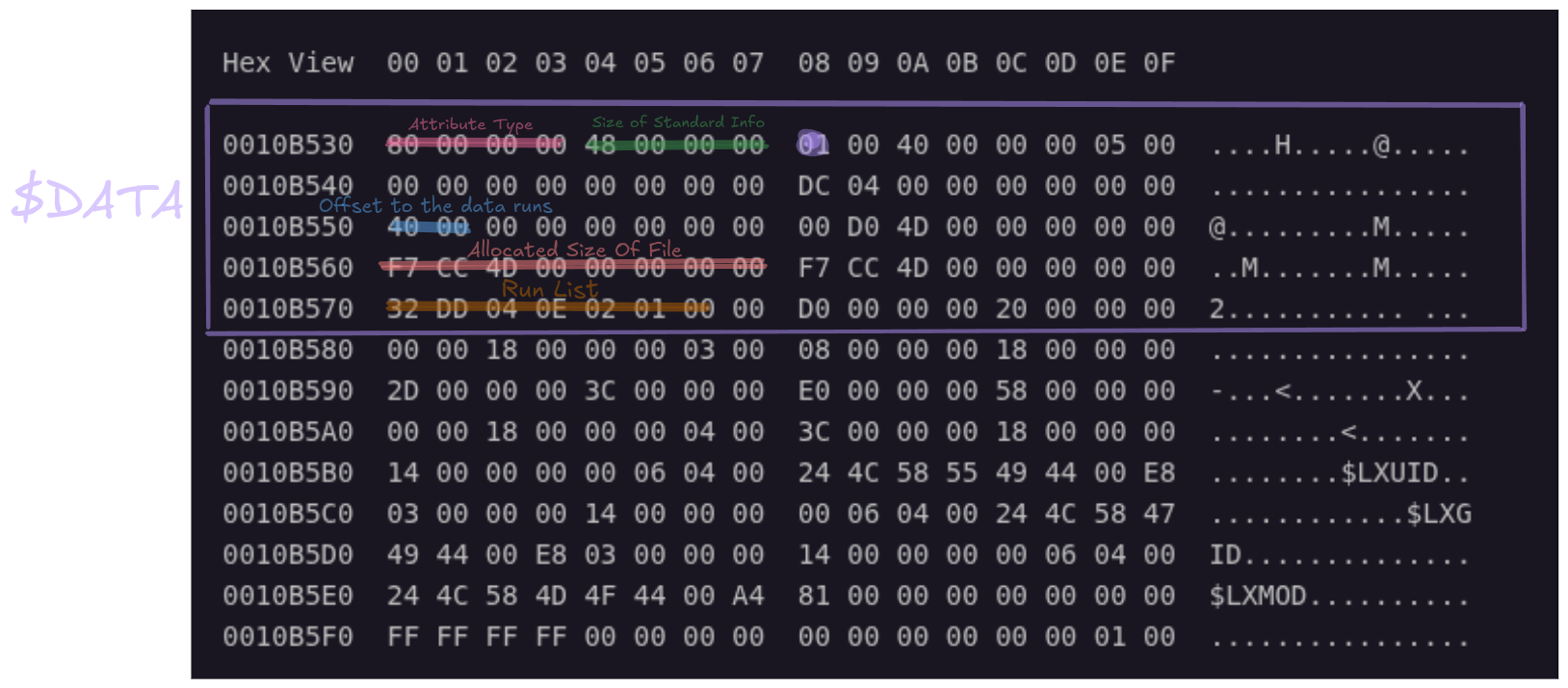
Run List
We found where the data actually lives :
32 DD 04 0E 02 01 00 00First byte is 32: [run-length-size | LCN-size]
2 - run-length-size -> DD 04 -little-endian–> 0x04DD
3 - The first cluster (LCN) -> 02 01 -little-endian–> 0x01020E Then after reading the run we end with 0` , meaning its the end of the runlist.
A run list is to pin point to which starting location and for how many are there cluster the data is stored.
The size of the file is 0x4DCCF7 -> 5098743 bytes -> 5.098743 MiB.
-
- Beginning of the file formula:
= (The first cluster,LCN) * (Size of cluser) + PartitionStart- Calculation:
0x01020E * 0x1000 + 0x00100000 = 0x01030E000-Decimal->271638528
- Calculation:
- Beginning of the file formula:
- End of the file formula:
= Beginning of file + Total size- Calculation:
0x01031E000 + 0x4DCCF7 = 0x0107EACF7
- Calculation:
Recovering None-Resident File
Now for the magic part (For 1 fragments, continuous data), which is that we recover the file from where its data resides:
dd if=disk.img of=SweetHearts.m4a bs=1 skip=271638528 count=5098743dd - A low-level byte copier
if=disk.img - My entire virtual disk image (Input)
of=SweetHearts.m4a - The recovered file we are reconstructing (Output)
bs=1 - Block size = 1 byte (everything is counted in bytes)
skip=271638528 - Start position inside disk.img
count=5098743 - How many bytes to copy (File Size)
dd if=disk.img of=./SweetHearts.m4a bs=1 skip=271638528 count=5098743

5098743+0 records in
5098743+0 records out
5098743 bytes (5.1 MB, 4.9 MiB) copied, 4.05138 s, 1.3 MB/s
And we got the file!!!
Even after deleting the file we can use the same command and recover deleted files.
After Deleting the file:
Hex View  00 01 02 03 04 05 06 07  08 09 0A 0B 0C 0D 0E 0F

0010B400  46 49 4C 45 2A 00 03 00    00 00 00 00 00 00 00 00  FILE*...........
0010B410  04 00 00 00 30 00 |00 00|  58 01 00 00 00 04 00 00  ....0...X.......
                             ^^^^^
Deleted Flag - Data may not be fully recovered since it can sometimes be overwritten with other data.
- Fresh deleted files are likely to be fully recovered.
It’s not the end yet!
Fragments
We can have multiple point of fragmented data stored, meaning we would have multiple runs, after all of them its going to end via 0.
This can happen because of:
- Free space holes
- File growth over time
- Reuse of deleted clusters
Fragmented random example: Say we have data of the run list:
00123450 11 05 64 11 03 32 11 02 EC 00To highlight which is which:
00123450  11 05 64
           │  │  └─ Offset = 0x64 = 100
           │  └──── Length = 0x05 = 5 clusters
           └─────── Header (1-byte length, 1-byte offset)

00123453  11 03 32
           │  │  └─ Offset = 0x32 = 50
           │  └──── Length = 0x03 = 3 clusters
           └─────── Header

00123456  11 02 EC
           │  │  └─ Offset = 0xEC = -20
           │  └──── Length = 0x02 = 2 clusters
           └─────── Header

00123459  00
           └─ End of runlist
Lets visualize it:
File Order:
┌─────────┐
│ Run #1  │ -> Clusters 100-104
├─────────┤
│ Run #2  │ -> Clusters 150-152
├─────────┤
│ Run #3  │ -> Clusters 130-131
└─────────┘
Recovering A Fragmented File
We here shall use a different strategy.
Run 1:
Length = 0x05 = 5 clusters
LCN delta = 0x64 = 100
So:
Start LCN = 100
Length = 5
Run 2:
Length = 0x03 = 3 clusters
LCN delta = 0x32 = 50
But, its RELATIVE to the first starting run LCN. So:
LCN2 = 100 + 50 = 150Run 3:
Length = 0x02 = 2 clusters
LCN delta = 0xEC = 236
So
LCN3 = 150 + 236 = 386
Length = 2
After we got where the fragmented data starts for each run which is: [chunk A] + [chunk B] + [chunk C].
We then extract them separately:
dd if=disk.img of=part1 bs=4096 skip=100 count=5
dd if=disk.img of=part2 bs=4096 skip=150 count=3
dd if=disk.img of=part3 bs=4096 skip=386 count=2
And then contaminate:
cat part1 part2 part3 > file.m4aAutomation
Via the logic above I have created a TUI that parses MFT, shows files that contain the deleted flag and show the reconstructed deleted files with their file name intact.
Via o I can recover all the deleted files from the disk into an auto created folder and sub folders of each partition and their corresponding deleted files.
Via my tool I have analysed how Windows handles deletions and files, which I then recovered both resident and none resident files.
Observations
Windows vs Linux NTFS
Linux
When the Linux driver writes files, it forces heavy POSIX security metadata ($LXMOD, etc.) into the MFT record. This leaves zero space for filenames, forcing them into external extension records which get instantly destroyed on deletion.
Meaning when I tried to delete a file in Linux, the file name of the file completely disappeared yet their data was still intact, which is a loss of data.
Windows
But usually in windows there are 2 types of deleted methods:
- Delete via Recycle Bin
- Instant delete
When deleting a file via Recycle Bin, It created 2 type of MFT records:
(Example)

$R0XI48E.png
$I0XI48E.png
The file that starts with $R contains the actual data of the deleted file while $I contains the absolute path of the file including the file name.
Meaning we could recover all of the data until it gets over written.
The second options was to delete it instantly which provided me with the original record with just its deleted flag, meaning no complicated reconstruction has to be made.
ADS
When I checked for data of my .png file that is not resident, I found out that it contains a resident data but it has more than one data attributes.
This is whats called data steams.
Example:
R0XI48E.png
├─ Main stream
├─ Zone.Identifier
├─ SummaryInformation
└─ CustomStream
A file can contain additional data that is not visible while browsing, like metadata, which could be used maliciously: https://owasp.org/www-community/attacks/Windows_alternate_data_stream